A POS for cafés and restaurants, from table to kitchen to receipt
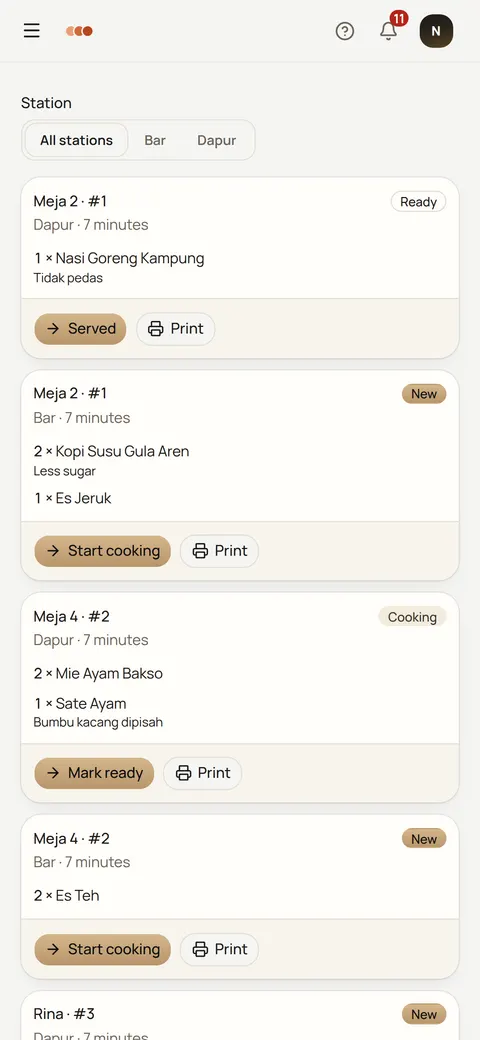
Open an order per table or as takeaway, and it appears right away on the kitchen screen per station, kitchen or bar. Cooks mark it started, ready, then served. Guests can order themselves from a table QR, the bill can be split per guest, and the service charge shows on its own line on the receipt.
Free for 30 transactions every 30 days
How it works
Open orders per table
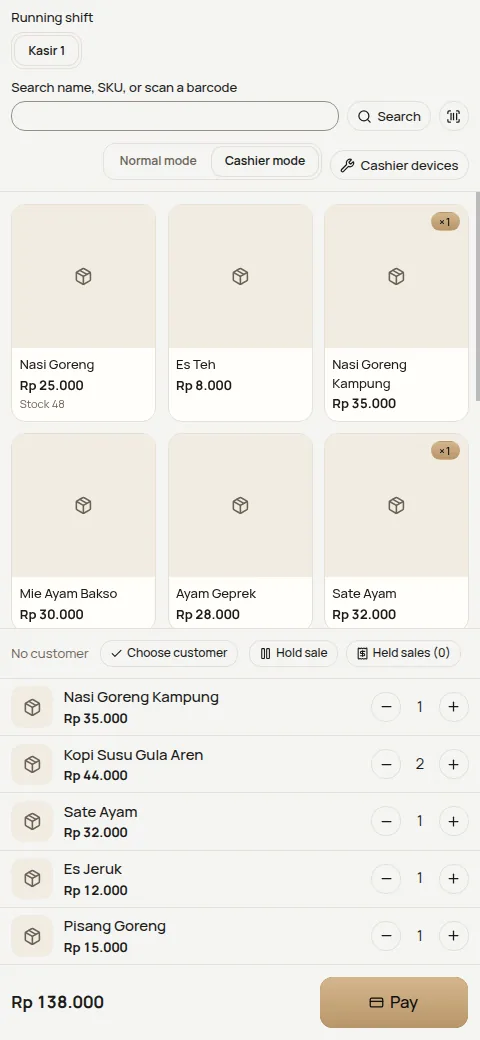
Choose a table or takeaway, then add items. Guests can also order themselves by scanning the table QR.
Send them to the kitchen
Orders appear right away on the kitchen screen per station, kitchen or bar, and tickets can also print on a kitchen printer. Cooks mark them started, ready, then served.
Split the bill and take payment
Split the bill per guest and take cash, your shop’s own QR or a bank card terminal. The service charge shows on its own line on the receipt.
Close the shift
Close the shift with a cash count and X and Z reports. Voids, returns and discounts above the limit need a manager’s PIN, and who approved each one is recorded.
What comes with it
Tables, kitchen and table QR
Open orders per table or takeaway, send them to the kitchen screen and printer, and let guests order themselves from a table QR. Split the bill per guest; the service charge shows on its own line on the receipt.
Customer display and till hardware
A second screen for the shopper, ESC/POS receipt printers over Bluetooth, USB or network, and a cash drawer that opens after a cash sale. On the web, printers and scales connect directly through Chrome.
Manager PIN
Voids, returns, discounts above the limit, manual price changes, and opening the drawer without a sale need a manager’s PIN. Who approved each one is recorded.
Shifts and stock counts
Open and close shifts with a cash count, X and Z reports, and stock counts whose differences go straight into the outlet’s stock.
Frequently asked questions
Guides by type of shop
POS for retail shops
Point of sale for grocery and clothing shops on Android or the web: scan barcodes, sell by weight, take cash, your own QR, a card terminal or store credit.
Stock management
Stock per outlet drops with every sale: supplier purchases, transfers, stock counts, damaged goods and expiry dates, plus net profit per period.
Offline POS
On Android and the web, Lamxo keeps selling when the internet drops and sends the data once you're back online. Receipt printers via Bluetooth, USB or network.
POS for multiple outlets
Run several shops from one account: each outlet has its own stock, prices and receipt numbers. Sales per outlet, best sellers and low stock on one dashboard.
Get your shop’s till in order today
Sign up free. Your first 30 till transactions every 30 days cost nothing.